

The Rhino Starter Kit
"My line weights look terrible"
Everything prints the same thickness. You spend hours tweaking individual objects. Still looks like a beginner portfolio.
"I have to export to Illustrator"
Rhino → Illustrator → InDesign. Every revision means re-exporting, re-linking, re-formatting. Studio deadline is in 12 hours.
"I'm starting from scratch every time"
New project, new Rhino file, new layer chaos. You rebuild the same structure every semester because you never saved a good template.
There’s a better way…
The Archidood Rhino Starter Kit takes you from model to portfolio-ready sheets in less than 30 minutes. You can jump straight into the fun part: designing.
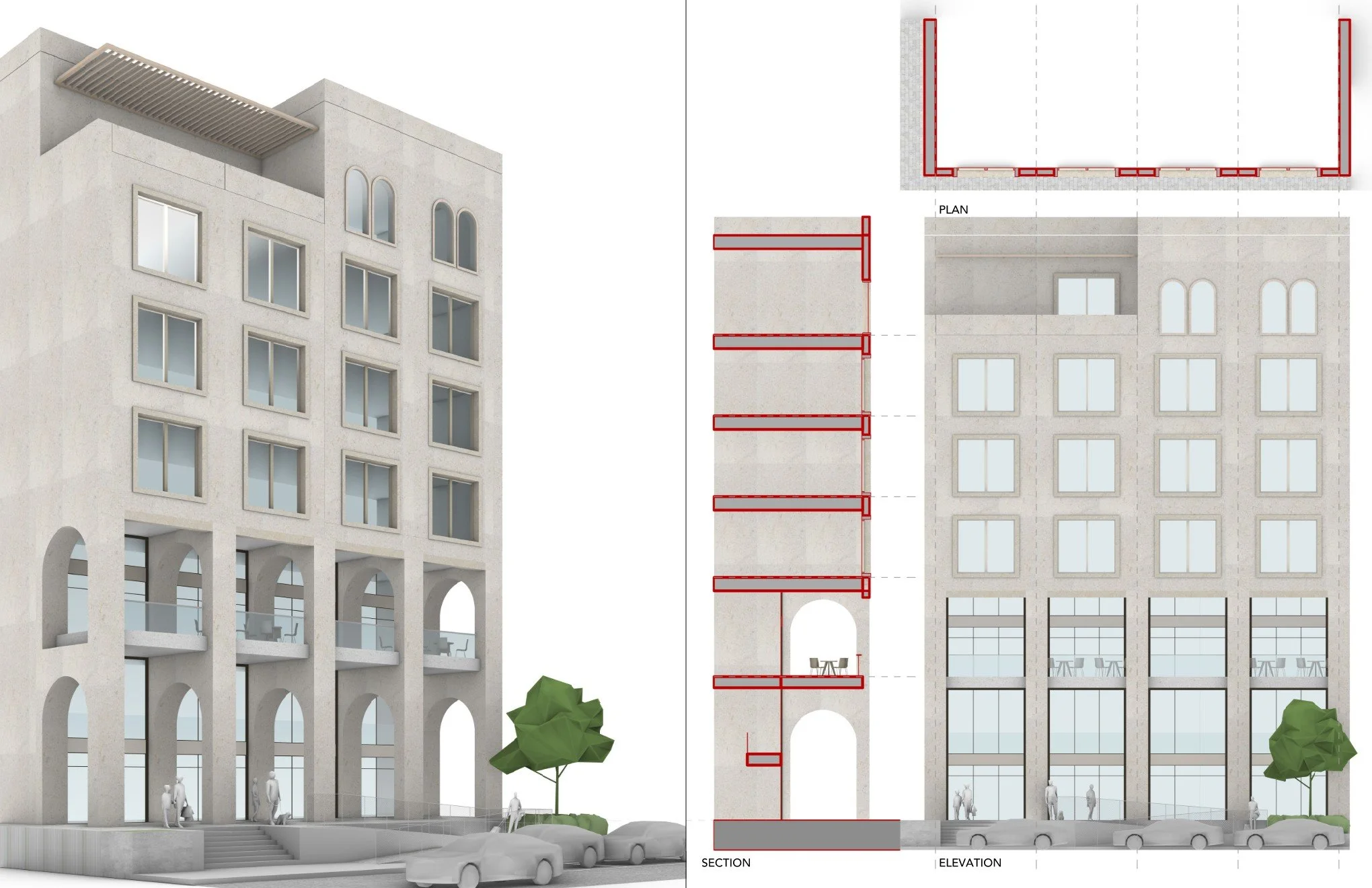
Model in Rhino. Print from Rhino.
The Rhino Starter Kit is a production system.
You get a pre-configured Rhino template with everything you need to go from 3D model to print-ready portfolio sheets without ever opening Illustrator.
What makes it different:
Line weights that actually work when you print
4 custom display modes (linework, shadows, rendered, hybrid)
Render-ready materials with texture maps
Layer system organized for clean output
Workflow that saves 10+ hours per project
It's the template you wish you had on day one of studio.
What You Get:
📄 Template File (Imperial Units) Pre-configured layer system with print-tested line weights. Materials and display modes ready to go. Open, model, print.
🎨 Material Library Render-ready materials with texture maps. Concrete, wood, glass, metal, brick—all included. Just drag and drop or use MatchProperties.
🌳 Tree Library Pre-made tree blocks as flat images (billboard style). Fast rendering, realistic look. Copy into your project in seconds.
🖼️ 4 Custom Display Modes
📐 Sample Project Example building showing proper layer usage and sample layout pages. Reverse-engineering—fastest way to understand the workflow.
🏛️ Facade Studies Three facade examples based on parking grid logic. Shows how to use blocks to populate buildings quickly. (with Grasshopper to auto-populate)
📖 10-Page Guide Step-by-step workflow: opening the template → modeling → setting up layouts → exporting to PDF. Plus troubleshooting and speed tips.
🔒 Single-User License Non-transferable. For your personal use.
📦 Lifetime Updates Buy once, get future updates free.
Invest in your workflow today so you can sleep tonight.
This Kit Was Made For You If:
Studio Survivor You have 48 hours until review. You need clean drawings now, not a 3-hour tutorial on layer management.
Portfolio Builder You're applying to grad schools or jobs. You need to get a portfolio ready for your interview next week.
Thesis Grinder You're deep in thesis and don't have time to rebuild your Rhino setup for the tenth time. You need a system that works.
If you can model it in Rhino, this template will help you print it cleanly.
No prior knowledge of display modes, line weights, or layout pages required.
Get the Rhino Kit
-
What you get:
✓ Rhino template with layers, materials, line weights
✓ 4 custom display modes
✓ Tree library + material textures
✓ Sample project + facade studies
✓ 10-page workflow guide
✓ Lifetime updates -
On top of what is above, click the link to:
Schedule a 30-minute 1-on-1 session with Wilfred
Portfolio review, Rhino workflow help, or concept development
Tailored to your specific project or goals
Frequently Asked Questions
Q: Does this work with Rhino 7 and Rhino 8?
A: Yes. Works with both Rhino 7 and Rhino 8 on Windows and Mac.
Q: Do I need to know how to use layouts or display modes?
A: Nope. The 10-page guide walks you through it step-by-step. If you can model in Rhino, you can use this template.
Q: What if I use metric instead of imperial?
A: This version is imperial (feet/inches). A metric version is coming soon. Email archidood@gmail.com if you need metric now—we can prioritize it.
Q: Can I customize the layers or materials?
A: Absolutely. The template is a starting point. You can add layers, change materials, or adapt it to your workflow. It's yours.
Q: What file formats can I export?
A: The template is optimized for printing directly from Rhino layouts to PDF. You can also export individual views as PNG, JPG, or AI if needed.
Q: Do I get updates if you improve the template?
A: Yes. Lifetime updates included. When we add Grasshopper scripts, or new facade studies, you'll get them free.
Q: What if I have questions or run into issues?
A: Email support@archidood.com. We respond within 24 hours. Plus, the 10-page guide includes troubleshooting for common issues.
Q: Is this a subscription or one-time purchase?
A: One-time purchase. Pay once, own it forever. No recurring fees.
Q: Can I use this for commercial projects?
A: The license is for personal use (studio projects, portfolio work, thesis). It is not for commercial use.
Q: What if it doesn't work for me?
A: I know you're going to find massive value in these tools and resources, I've built my brand on offering quality resources. Because the toolkit contains dozens of digital goods that you'll have access to immediately upon enrolling, it's my policy to not offer refunds. If you have any questions about what's included or if it's a good fit for you, please reach out before you purchase; I'll gladly answer your questions.